
One scan, many stacks
Rule-based detection covers roughly 26 ecosystems, from Rust and Node.js to Python, JVM, .NET, PHP, Ruby, Go, and C/C++.
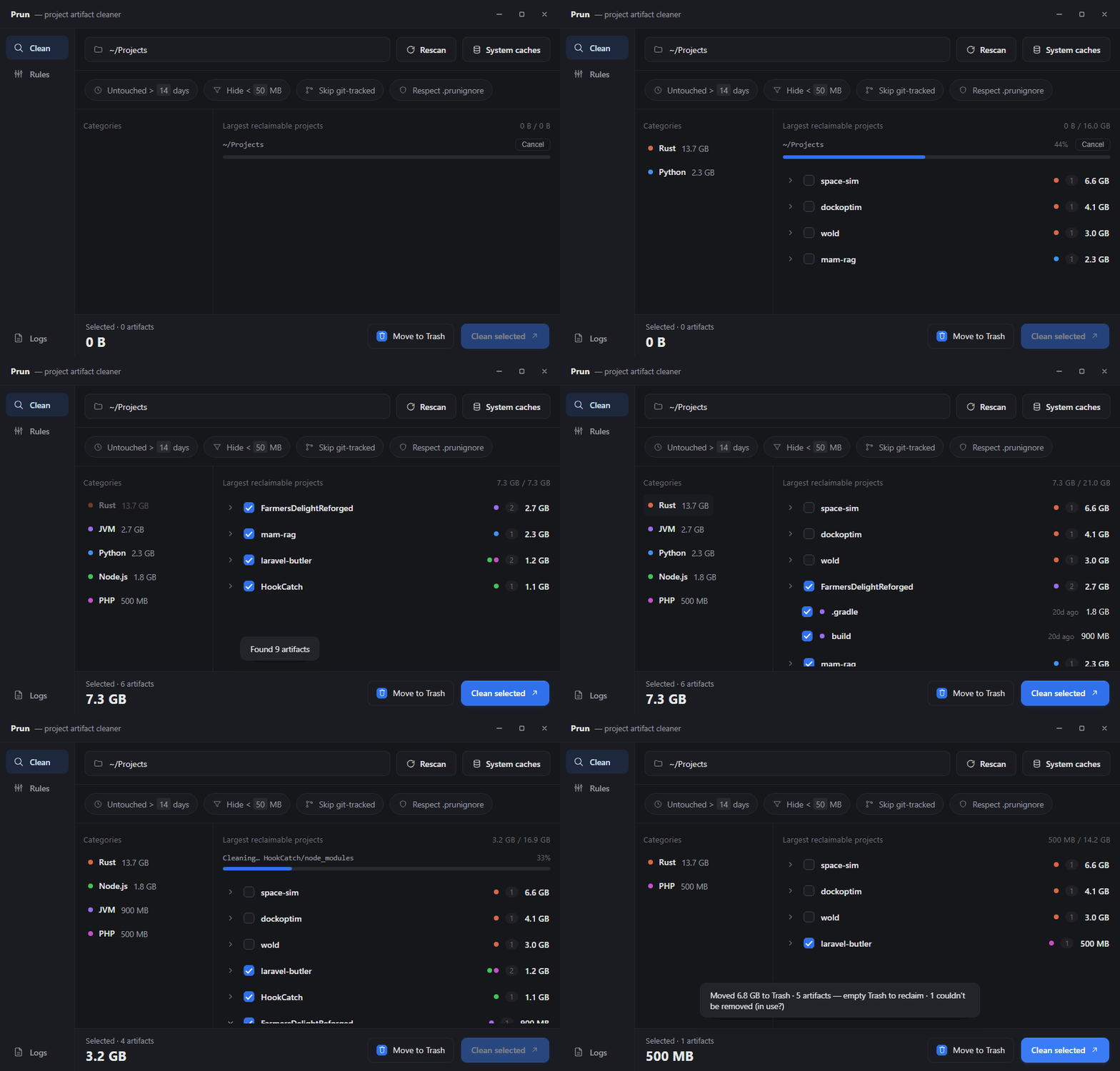
Prun finds the disposable artifacts hiding across your projects — then lets you reclaim the space with context, control, and Trash as the default.
node_modules18.4 GBtarget11.2 GB.venv6.7 GB.gradle2.4 GBnode_modulestarget.venvvendor.gradlebin/objDerivedData
Every result stays attached to the project and ecosystem it came from, so a large number never becomes a blind decision.
Rule-based detection covers roughly 26 ecosystems, from Rust and Node.js to Python, JVM, .NET, PHP, Ruby, Go, and C/C++.
Move artifacts to the system Trash first. Permanent deletion always takes a deliberate second confirmation.
Focus by age, minimum size, ecosystem, Git status, or your own .prunignore rules.
Add, edit, or disable detectors in the app. Overrides layer over the built-in rules, so future defaults still reach you.
Choose a root, drop in a folder, or scan shared system caches such as Cargo, npm, and Gradle.
See exact paths, sizes, ages, and ecosystem labels. Filter the list without rescanning.
Select only what you want, then send it to Trash or explicitly choose permanent deletion.
Prun ships a CLI over the same scan and clean core. Preview by default, emit JSON for scripts, and require an explicit --yes before scan-based cleaning.
$ prun scan ~/Projects --min-age 30
├─ atlas/node_modules 4.8 GB
├─ ember/target 2.1 GB
└─ aurora/.venv 1.3 GB
8.2 GB reclaimable across 14 artifacts
$ prun clean --scan ~/Projects --dry-run
Dry run — no files changed.
Point Prun at the folder that contains your projects. It walks the whole tree, finds every
node_modules — along with the other artifacts each project left behind — and lists them grouped by
project with their sizes. Select what you want and clean it in one pass. From the command line the same scan is
prun scan ~/Projects, and prun clean --scan ~/Projects --yes does the removal.
Yes — these directories are regenerated by your next install or build, which is why Prun only ever proposes
artifacts of that kind. It adds three further guards: cleaning moves items to the system Trash by default so a
mistake is recoverable, directories that git tracks are skipped because a tracked build directory may be
intentional, and a .prunignore file lets you exclude paths permanently. A permanent delete is opt-in
and needs a second confirming click.
npkill is a Node CLI focused on node_modules
specifically. kondo is a Rust CLI with a TUI covering 20+
project types and is the closest comparison. ncdu and other disk analyzers show you what is large but do not know
what is safe to remove. Prun covers roughly 26 ecosystems, groups results by project in a desktop GUI, moves to
Trash by default, respects .prunignore and git-tracked status, and lets you edit the detection rules
in-app — with the same core available as a headless CLI.
Roughly 26 ecosystems out of the box, including Rust (target), Node.js (node_modules,
.next, dist), Python (.venv, __pycache__), JVM and Gradle
(build, .gradle), Go, .NET (bin, obj), PHP
(vendor), Ruby, C/C++ and CMake, Swift and Xcode (DerivedData), Dart, Zig, Haskell,
Elixir/BEAM, Nim, Crystal, Bazel, Nix, and LaTeX — plus per-user package caches such as the Cargo registry, npm,
and Gradle, and cross-cutting junk like OS files and editor swap files.
Yes. Prun is a Tauri v2 desktop app with a Rust backend and builds on all three platforms, as does the CLI. There
is no prebuilt binary published yet, so it is currently built from source with npm install and
npm run tauri build, which needs Node 18+ and the Rust toolchain.
Yes. The headless CLI exposes the same scan, clean, caches, and rules core. A scan-driven clean defaults to a dry
run unless you pass --yes, so a cron job can safely start by printing what it would do:
prun clean --scan ~/Projects --min-age 30 prints the plan, and adding --yes performs it.
--json gives machine-readable output, and --delete removes permanently instead of
trashing, which is the usual choice for reclaiming CI cache space.
Three ways, in increasing permanence: leave the item unselected, since nothing is cleaned unless you select it;
add a .prunignore file at the scan root using gitignore syntax, which excludes matching paths from
results; or open the Rules tab and disable or edit the rule that matched. Rule edits are saved as an override
layered on top of the built-in ruleset, so later updates to the built-in rules still reach you.